EndeavorOTC®: Outplay ADHD
- 3.5
- Rating
- 50.00K
- Installs
- Free
- Price

 Analysis by App-foxy
I approached EndeavorOTC®: Outplay ADHD as a medical app rather than a typical productivity download. Its purpose is not to give me another checklist, timer, or collection of motivational reminders. It is a digital therapeutic from Akili Interactive Labs, Inc., designed for adults who want a structured, game-based way to work on attention-related difficulties. That makes the experience more focused, but it also means I judge it differently from an ordinary mobile game.
The most important point is that this is the only FDA-authorized digital therapeutic for ADHD that does not require a prescription. That is a meaningful distinction, but it does not turn the app into a replacement for a clinician, medication, therapy, sleep improvements, or practical changes at home and work. I found it more useful to think of it as a guided training option that may fit alongside broader ADHD care, not as a complete answer by itself.
It is free to install, carries an Everyone age rating, and has reached over 50 thousand installs. The overall store score is around a 3.5 average from roughly 400 ratings, with more than 250 written reviews. Those figures suggest a mixed but substantial early audience: enough public experience to make the app worth examining, while also reminding me that it will not feel equally suitable for everyone.
You May Also Like

 Blood Strike: 2.5 Anniversary
Blood Strike’s Loadouts Turn Every Drop Into a Tactical Gamble
A close look at Blood Strike’s custom loadouts: how fast access to signature weapons reshapes its battle royale rhythm, rewards preparation, and narrows the gap between fights.

 Pandora - Music & Podcasts
Pandora’s Music Is Easy to Start, but Harder to Recover
Pandora’s strength is its low-effort path from a seed to a station. Its weak spot is how much confidence it asks you to place in connection, setup, and quiet recovery.

 8 Ball Pool
 Is Built on Rivalries, Rematches, and Routine
A close look at the rivalries, rematches, shared routines, and unanswered safety questions that turn a quick pool match into a persistent mobile community.

 Samsung Music
’s Quiet Strength Is Playing What You Already Own
Its reach comes less from spectacle than from dependable access to a personal library. That simplicity is both the app’s strongest retention engine and its ceiling.

 AccuWeather: Weather Radar
AccuWeather Review: A Quick, Clear Forecast for Everyday Decisions
For everyday plans, the best forecast is the one you can understand quickly. AccuWeather makes rain timing, radar, and local conditions easy to act on, with a few trade-offs.

 Hill Climb Racing
Why Hill Climb Racing Still Turns Crashes Into One More Run
A tiny car, a bumpy hill and one more upgrade: Hill Climb Racing keeps resurfacing because its simple chaos makes every near-miss feel personal.
More From Our News Desk
View All News


What using the app feels like in everyday life
The central appeal is the attempt to turn attention practice into something I can actually sit down and do. Many ADHD tools ask me to organize my life before helping me manage it. That can be a problem when the difficulty is precisely getting started, staying with one task, or returning after an interruption. A therapeutic game changes the entry point: instead of opening a blank planning screen, I begin with an activity that has a defined purpose and a clear session structure.
That difference matters in a realistic situation. Imagine I have a workday with several unfinished emails, a report waiting for review, and a habit of switching to unrelated apps whenever a task becomes dull. A conventional task manager can tell me what remains undone, but it cannot make the act of focusing feel less resistant. A short session with this app may be easier to begin because it does not require me to design a productivity system first. Afterward, I could move directly into the report while the intention to concentrate is still fresh.
I would not treat that sequence as a guaranteed medical result. The useful workflow is the combination of a repeatable exercise and a deliberate transition into a real-world task. If I finish a session and immediately lose time scrolling, the therapeutic activity has been isolated from the problem I hoped to address. My practical tip is to decide beforehand what I will do next, keep that task visible, and start it straight away rather than searching for another distraction.
This is also where the app differs from meditation software. Mindfulness tools generally emphasize breathing, awareness, and observing thoughts. EndeavorOTC® is aimed at attention-related training through an interactive format. A planner, meanwhile, helps externalize responsibilities, and a focus timer creates a boundary around work. Those tools remain useful because they solve different problems. I would pair them rather than expect one app to replace all three.
Speed expectations before the first session
My expectation of speed here is less about a dramatic loading benchmark and more about how quickly the app lets me move from intention to practice. Medical apps can feel slow when they bury the main activity under forms, explanations, or repeated setup. For someone with ADHD, every extra decision at the start can become a reason to postpone using the product.
The better way to approach this app is to give it a calm first run instead of judging it during a rushed commute. I would install it on a compatible device, make sure the operating system meets its requirement, and begin when I have enough uninterrupted time to understand the experience. Once I know the path into a session, later use should be easier to evaluate because I am no longer learning the interface and judging the therapeutic activity at the same time.
The current version is 4.0.1, and the minimum operating system is version 12. That makes device compatibility an important first check for anyone using an older phone or tablet. A newer version number does not automatically mean that every device will feel equally responsive, so I would leave storage and background activity under control before a session. This is especially sensible for an app that presents itself as an interactive therapeutic rather than a static reading tool.
I also recommend resisting the temptation to use the first session as a test of personal ability. Attention can vary with sleep, stress, medication timing, noise, and the time of day. If the opening experience feels difficult, that may reflect the moment rather than the app’s value. I would try it during a reasonably typical part of the day and note how easy it is to begin, how often I want to quit, and whether the transition back to ordinary work feels manageable.
What happens during heavier use
The demanding moment is not necessarily installation. It is repeated use when I am tired, distracted, or trying to fit a session between obligations. An interactive therapeutic has to compete with more stimulating entertainment, and that competition becomes sharper after a long day. The app’s game-like approach may lower the barrier to starting, but it cannot remove the need for consistency.
For that reason, I would avoid scheduling it at the exact point when my attention is already exhausted unless that is the condition I specifically want to observe. A better routine is to connect it to a stable part of the day, such as before beginning administrative work or after a regular break. The goal is not to squeeze it into every spare minute. The goal is to make its use predictable enough that I can notice whether it supports a broader routine.
Heavy use also includes the practical strain of switching between the therapeutic activity and other apps. If I use a phone for work messages, music, navigation, and entertainment, interruptions can break the mental context. I would silence avoidable alerts and avoid running unrelated activities in the background. That is not a special medical requirement; it is simply a fair way to judge an attention-focused app without surrounding it with preventable distractions.
Another trade-off is motivation. A game format can make practice more approachable than a clinical worksheet, but some people will still find repetition tiring. If I need constant novelty, I may lose interest even if the underlying exercise is well designed. Conversely, someone who prefers a clear routine may appreciate not having to invent a new activity each time. The right question is not whether it feels like entertainment, but whether I can return to it without treating every session as a chore.
Reliability, continuity, and recovery after interruptions
Reliability has two sides here. The first is technical: the app should open, run, and let me continue without unnecessary friction. The second is behavioral: I need a routine that survives missed days, busy weeks, and imperfect attention. A medical app can be technically stable and still fail me if its place in daily life is too demanding.
I would test reliability over several ordinary situations rather than relying on one successful launch. I would try a session at home, another when the phone has several everyday tasks competing for attention, and another after an interruption. The useful observation is whether I can recover calmly. If a notification, phone call, or change of location breaks the session, I want the next step to be obvious rather than forcing me to reconstruct what I was doing.
Recovery is particularly important for ADHD because an interruption can become a full stop. My advice is to treat a missed session as a scheduling problem, not as proof that the routine has failed. I would choose the next realistic opportunity and continue, instead of attempting an exhausting catch-up plan. The app is more likely to help when I use it as a repeatable part of care rather than as a test of perfection.
I would also keep expectations measured around progress. A few sessions may feel engaging, but perceived improvement in everyday attention is harder to judge honestly. I would watch for practical signs: whether I return to a task more easily, whether I notice distraction sooner, or whether starting routine work feels less difficult. Those observations are more useful than deciding that the app worked or failed based on one unusually productive afternoon.
Because this is a medical product, I would discuss meaningful concerns with a qualified healthcare professional, especially if I have an ADHD diagnosis, another condition affecting attention, or an existing treatment plan. The app’s non-prescription status makes access simpler; it does not eliminate the value of professional context. I would also avoid changing medication or stopping another treatment merely because a digital exercise feels promising.
Device limits and the cost of access
The operating system requirement is one of the clearest practical filters. Anyone with a device below iOS or Android version 12 should check compatibility before building a routine around the app. Even on a supported device, I would prefer a phone or tablet that is comfortable to hold and has a screen large enough for sustained interaction. A cramped display, unreliable touch response, or a nearly full device can make a therapeutic session feel harder than it needs to be.
Resource demands should be judged conservatively because the available product facts do not establish a universal battery, memory, or data-use result. My own approach would be to begin with a charged device, close unnecessary background activity, and observe whether the phone becomes unusually warm or the battery drops faster than expected during normal use. Those checks are more useful than assuming every model will behave the same way.
The download is free, but in-app purchases range from about fifteen dollars to around one hundred thirty dollars per item. That changes the decision considerably. I would not treat the free installation as the complete financial commitment without first understanding what access I receive and what continued use may involve. A person comparing it with free timers or planners should recognize that those alternatives have a different cost structure and a different purpose.
For someone already paying for clinical care, the relevant question is whether this adds enough value to justify another expense. For someone without access to prescription treatment, the non-prescription model may be appealing, but affordability still matters. I would set a personal spending limit, read the purchase screens carefully, and decide whether the app fits my care budget before committing to longer-term use.
The Everyone rating makes it broadly accessible from an age-label perspective, but I would still consider the intended user and the role of an adult or clinician when appropriate. A general content rating does not mean the app is equally suitable for every person with concentration difficulties. Children, teenagers, and adults may have different support needs, and attention problems can arise from many causes beyond ADHD.
Where it beats ordinary alternatives—and where it does not
Compared with a standard to-do list, this app offers an active practice experience rather than another place to record obligations. That is its strongest conceptual advantage. If my main problem is knowing what I should do, a planner remains better. If I know the task but repeatedly fail to sustain attention, a structured therapeutic activity may address a more relevant part of the problem.
Compared with a focus timer, it is more than a countdown. A timer is excellent when I already have a task, a workable environment, and enough motivation to begin. This app is more interesting when I want a dedicated attention exercise before tackling that task. The trade-off is that a timer is simpler, faster to understand, and usually easier to use in any situation.
Compared with medication, coaching, or therapy, it occupies a different place entirely. It may be more convenient to access and easier to fit into a private routine, but it does not offer the individualized assessment and adjustment that a clinician can provide. I would consider it a poor choice for anyone seeking immediate symptom relief, diagnosis, crisis support, or a complete treatment plan.
It is also not the right pick for someone who dislikes game-based interfaces, cannot use a supported device, or wants a tool that manages calendars and reminders. In those cases, a conventional organizer, coaching relationship, or clinical consultation may deliver more direct value. The app’s distinctive format is an advantage only when that format matches how I am willing to practice.
My performance verdict after weighing the trade-offs
My overall impression is cautiously positive. The app’s most convincing strength is not that it makes a bold promise, but that it gives attention practice a concrete starting point. The non-prescription FDA authorization makes it unusually notable in the ADHD app category, while the free installation lowers the barrier to exploring it. At the same time, the purchase range means I would examine the access model before recommending it without qualification.
In terms of perceived speed, I would expect the best experience from a supported, reasonably maintained device and a deliberate first setup. In heavy-use moments, the main challenge is likely to be maintaining a routine when novelty fades or interruptions appear. For reliability, I would judge the app over repeated ordinary sessions, not one launch. For recovery, I would use a restart-friendly mindset and avoid turning missed practice into an all-or-nothing failure.
My practical recommendation is to test it as one part of an attention routine, not as a standalone cure. Choose a consistent time, prepare the next real-world task before opening it, reduce avoidable notifications, and assess changes in daily functioning over time. If the format helps me begin and return to focused work, it earns a place beside my existing tools. If I need scheduling, personal clinical guidance, or a completely free solution, another option will probably serve me better.
EndeavorOTC®: Outplay ADHD is therefore best suited to adults looking for a structured, interactive digital therapeutic and willing to evaluate it patiently. I would recommend trying it to a friend who wants something more purposeful than a timer but less burdensome than building a complex productivity system. I would also be honest that device compatibility, possible in-app costs, personal response, and the need for broader ADHD support all affect its value. Used with those limits in mind, it is a thoughtful option rather than a magic shortcut.
FAQs for EndeavorOTC®: Outplay ADHD
01What is EndeavorOTC®: Outplay ADHD, and how does it work?
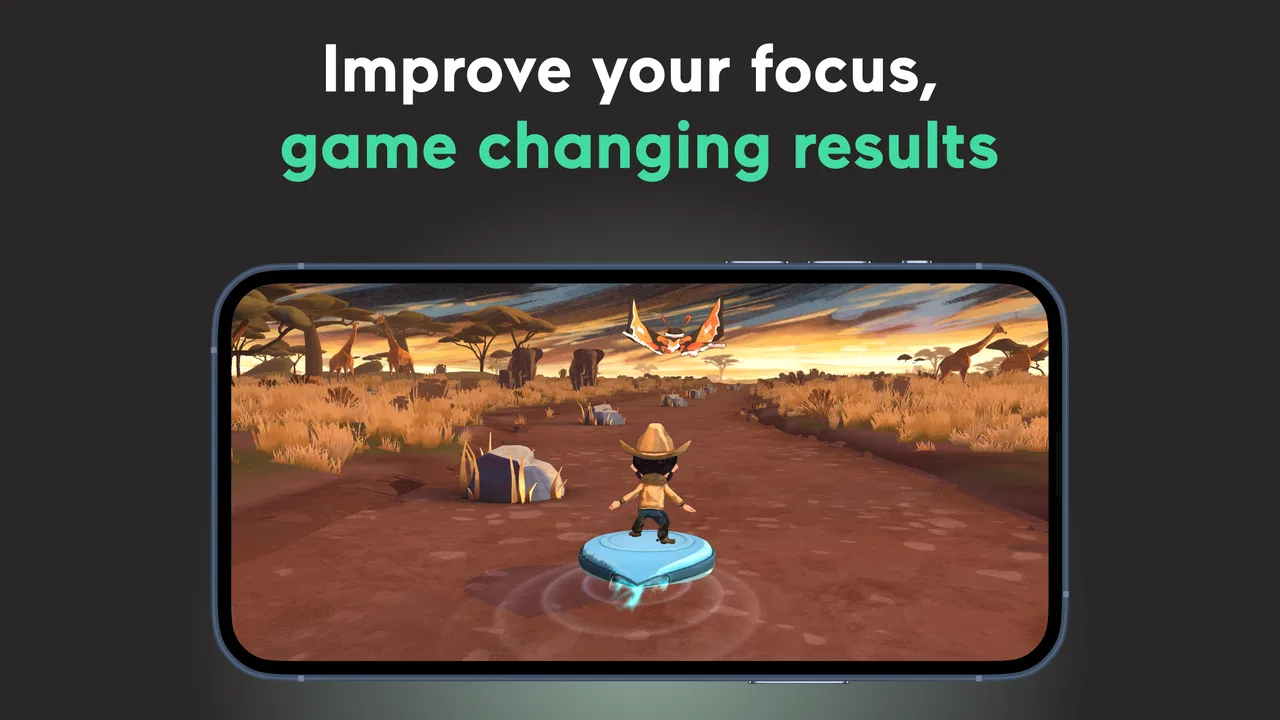
EndeavorOTC®: Outplay ADHD is a mobile game-based digital therapeutic designed to support attention and focus skills in people with ADHD. It combines action-oriented gameplay with cognitive challenges that encourage users to divide attention, respond quickly, and manage distractions. The app is intended to complement—not replace—professional diagnosis, treatment, medication, therapy, or advice from a qualified healthcare provider.
02Who can use EndeavorOTC®: Outplay ADHD?
The app is designed primarily for individuals with ADHD, but eligibility may depend on factors such as age, location, device compatibility, and the program’s current availability. Parents or caregivers should review the requirements carefully before allowing a child to use it. Because ADHD symptoms and treatment needs vary, users should consult a healthcare professional to determine whether this type of digital program is appropriate for them.
03Is EndeavorOTC®: Outplay ADHD a replacement for ADHD medication or therapy?
No. EndeavorOTC®: Outplay ADHD should be viewed as a supportive tool rather than a substitute for prescribed medication, behavioral therapy, coaching, or clinical care. Stopping or changing treatment without medical guidance can be unsafe. The app may be useful alongside an established care plan, but users should discuss its role with a doctor or mental-health professional, especially when symptoms significantly affect school, work, relationships, or daily activities.
04Does EndeavorOTC®: Outplay ADHD require a subscription or payment?
Availability, pricing, trial periods, and subscription options may vary by country, platform, eligibility, and current program terms. Before downloading or starting a trial, review the purchase screen carefully for renewal dates, billing frequency, cancellation rules, and whether access is offered through a healthcare provider or another program. If a subscription is activated through Google Play or the App Store, cancellation normally must be managed through that store’s account settings.
05What devices and permissions are needed to use the app?
EndeavorOTC®: Outplay ADHD requires a compatible Android or iOS device and an operating-system version supported by the developer. The exact requirements can change with updates, so check the official store listing before installation. The app may also need internet access, account registration, notifications, and other permissions to deliver gameplay, synchronize progress, or provide reminders. Confirm that your device has sufficient storage and a stable connection.
Pros
- Short
- game-based tasks make ADHD support feel engaging and approachable.
- Progress tracking can help users notice patterns in focus and task completion.
- Designed for mobile use
- making exercises easy to access during daily routines.
- May complement professional ADHD care with practical attention-building activities.
- A structured format can encourage consistent practice over time.
Cons
- It is not a replacement for diagnosis
- medication
- or professional ADHD treatment.
- Benefits may vary significantly between users and require regular participation.
- Some features or content may require a paid subscription or in-app purchase.
- Game-style exercises may feel repetitive after extended use.
- Requires personal data and usage information
- so privacy settings deserve attention.

EndeavorOTC®: Outplay ADHD
Gallery